Stop Duplicating Translations in ODAC.JS 1.8
Every internationalized Node.js app eventually hits the same two walls. First, your translation files end up tangled with runtime artifacts in .gitignore hell. Second, the moment you expand from Portuguese to Brazilian Portuguese, or from generic Chinese to Traditional and Simplified scripts, you are forced to copy and maintain 1,400 identical JSON keys just to change a handful of words.
In ODAC.JS 1.8.0, we refused to accept either compromise. Translation files now live at the project root in lang/ (or any custom path via lang.path in odac.json), and regional or script variants like pt-BR, zh-Hant, and es-419 work through sparse overrides instead of brute-force duplication.
Show Me The Code
Here is a complete regional setup in ODAC.JS 1.8.0. You configure your supported tags once in odac.json, keep shared translations in the parent language file, and store only the differences in the regional file.
// odac.json
{
  "lang": {
    "default": "pt",
    "supported": ["pt", "pt-BR", "zh-Hant"],
    "path": "lang"
  }
}
Now look at how lean lang/pt-BR.json stays compared to lang/pt.json:
// lang/pt.json
{
  "Bus": "Autocarro",
  "Hello": "Olá"
}
// lang/pt-BR.json
{
  "Bus": "Ônibus",
  "Hello": ""
}
When a Brazilian visitor hits your route, "Bus" resolves to "Ônibus", while "Hello" inherits "Olá" straight from lang/pt.json. In your views and controllers, nothing changes except that your language APIs now speak canonical BCP-47:
// route/www.js
Odac.Route.page('/{lang}/about', 'About')

// controller/About.js
module.exports = function (Odac) {
  Odac.Lang.set(Odac.request('lang'))

  const formattedDate = new Date().toLocaleDateString(Odac.Lang.current())
  Odac.set('formattedDate', formattedDate)
  Odac.set('greeting', Odac.__('Hello'))
  Odac.cache(3600)
  Odac.View.skeleton('main').set('content', 'about')
}
<!-- view/content/about.html -->
<section>
  <h1><odac translate>Hello</odac></h1>
  <p><odac translate>Bus</odac></p>
  <p><odac translate>Last updated: <odac var="formattedDate" /></odac></p>
</section>
Notice Odac.Lang.current() feeding directly into toLocaleDateString(). Because ODAC.JS normalizes the active code into canonical BCP-47 form, your server templates, Intl formatters, and <html lang> attribute stay perfectly aligned without custom string parsing.
Why storage/language/ Had to Go
Previously, ODAC.JS stored translation JSON files inside storage/language/. On paper, it looked convenient. In practice, it created a constant architectural contradiction.
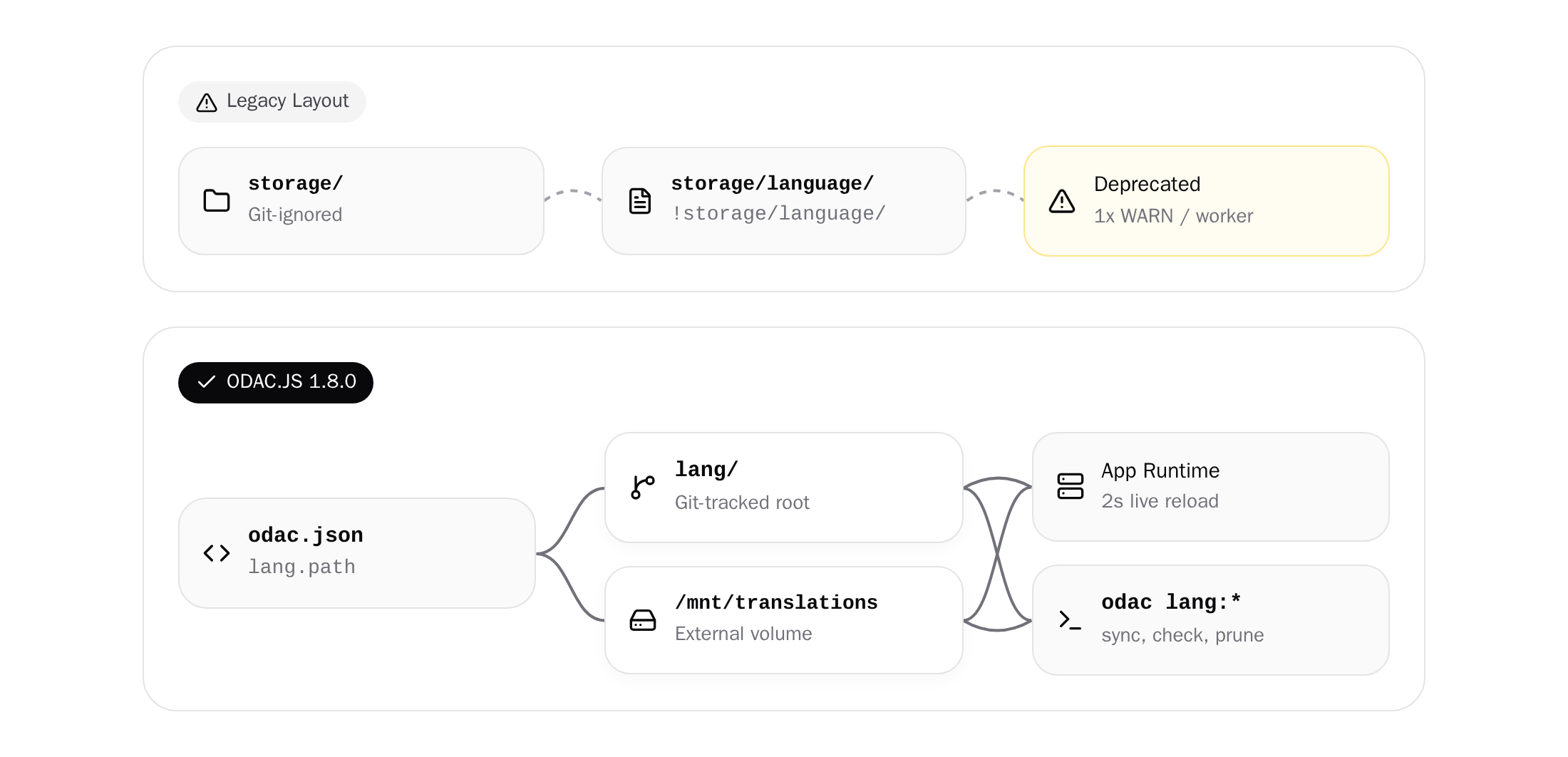
In an ODAC.JS project, storage/ exists for git-ignored runtime state: caches, logs, and user uploads. Keeping source-controlled translation files inside a git-ignored directory forced every team to punch negated !storage/language/ exceptions into .gitignore. Worse, deployments that mounted storage/ as an ephemeral or shared container volume risked shadowing the translation files baked into the repository.
ODAC.JS 1.8.0 draws a clean boundary between source code and runtime artifacts:
- Committed by default: Translation files now live in
lang/at the project root, right alongsidecontroller/,route/, andview/. - Configurable via
lang.path: Need your editorial team or an external pipeline to update JSON files on a mounted production volume while the application directory stays read-only? Set"path": "/mnt/translations"(or any relative or absolute directory) underlanginodac.json. - Unified runtime and CLI resolution: Both the running application server and every
npx odac lang:*command read and write using the exact samelang.pathresolution. - Zero-breakage transition: If
lang/does not exist andlang.pathis unset, ODAC.JS continues reading fromstorage/language/and emits a single structured warning per worker so existing apps keep running until you migrate.
Sparse BCP-47 Overrides Without the Key Tax
Two-letter ISO codes break down the second your product leaves a single region. Brazilian Portuguese (pt-BR) and European Portuguese (pt) diverge on everyday nouns, Latin American Spanish (es-419) differs from Castilian Spanish, Filipino (fil) requires three letters, and Chinese splits cleanly by script (zh-Hant and zh-Hans) rather than country alone.
ODAC.JS 1.8.0 expands language tags to the language[-Script][-REGION] subset of BCP-47. That gives you clean support for pt, fil, pt-BR, es-419, zh-Hant, zh-Hans, and zh-Hant-TW without dragging in unpredictable extension subtags.
More importantly, we designed regional files around a sparse override model. An empty string ("") in lang/pt-BR.json does not mean "broken" or "untranslated." It means "inherit from my parent."
ODAC.JS resolves every key through a predictable fallback chain:
- Active regional or script file: Check
lang/pt-BR.json(orlang/zh-Hant-TW.jsonfirst, thenlang/zh-Hant.json). - Parent language file: Fall back to
lang/pt.json(orlang/zh.json) when the regional entry is""or absent. - Application default language: Fall back to
lang.defaultinodac.jsonif the parent language also leaves the key untranslated. - Source key: Return the raw key itself if no language defines a translation.
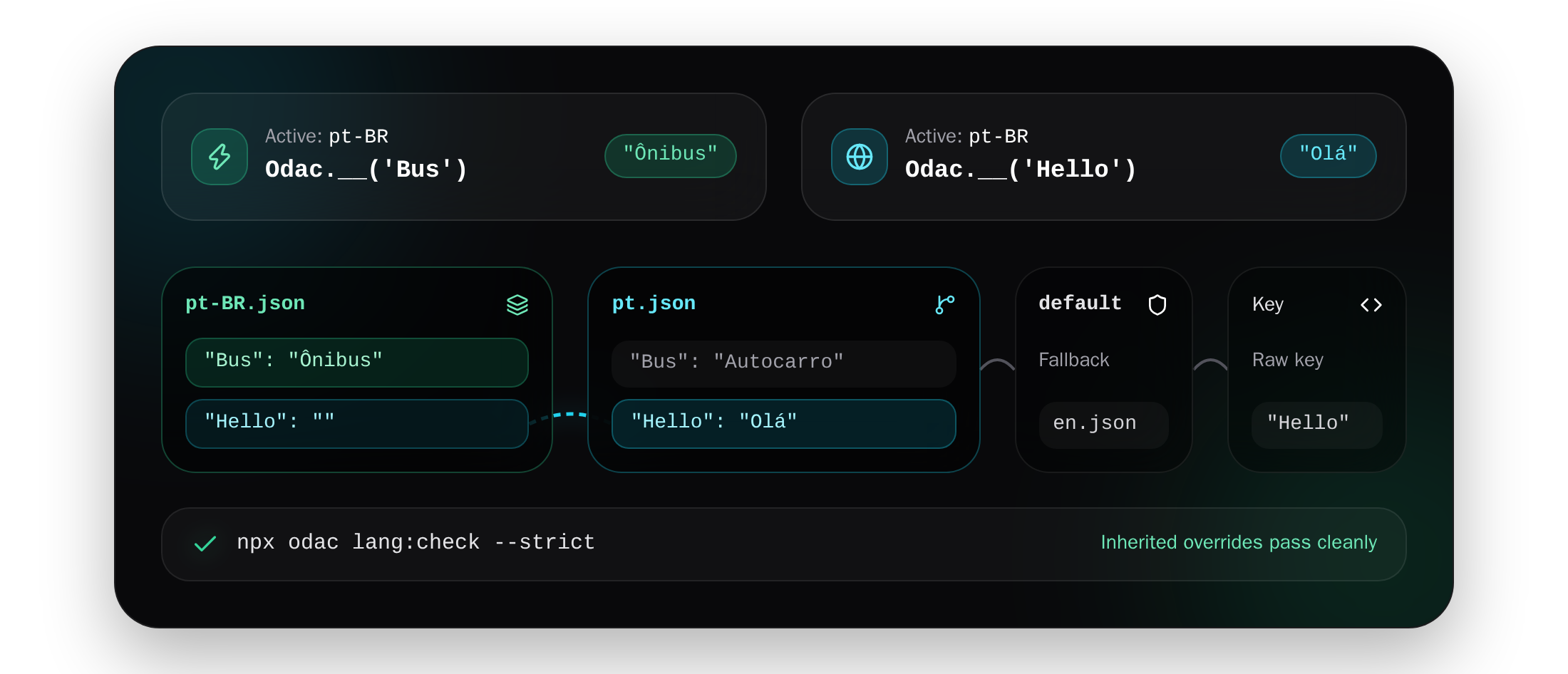
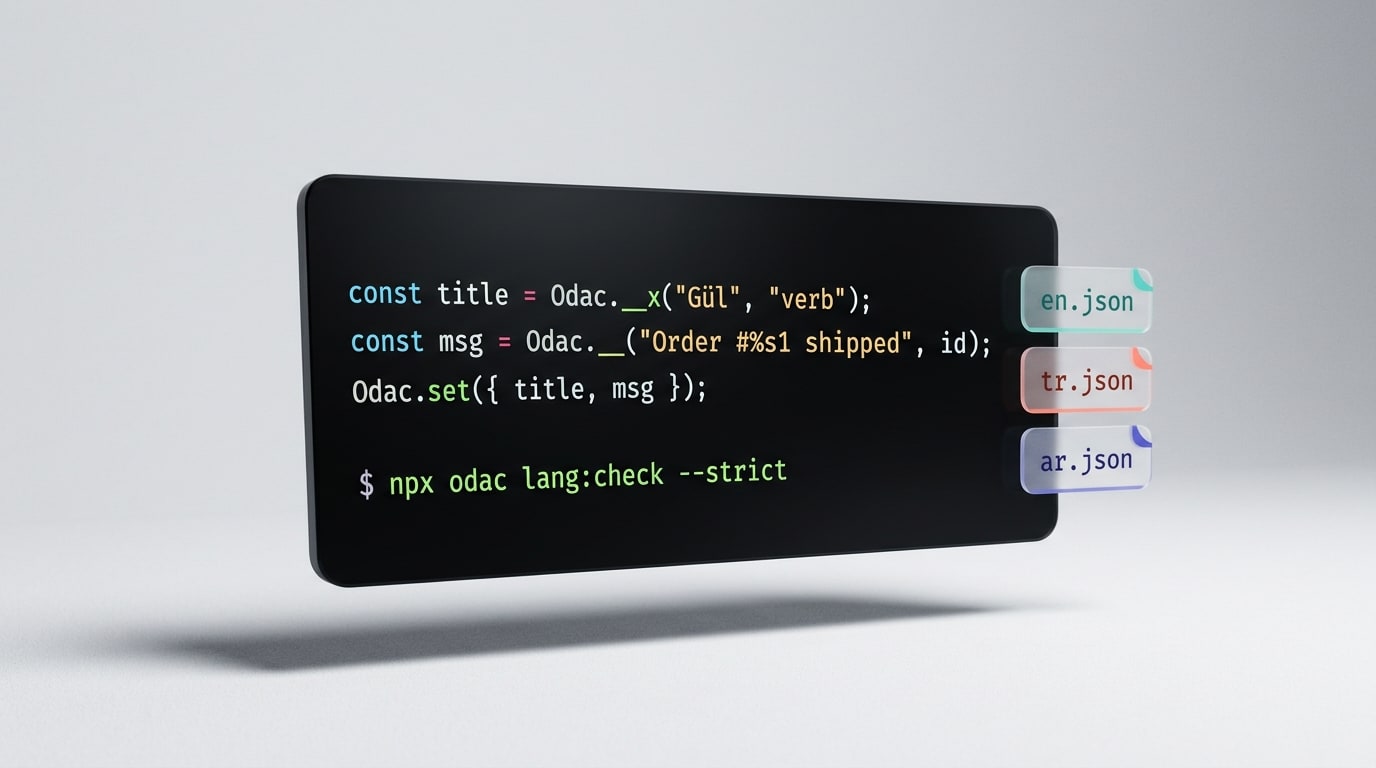
Here is why this matters for daily engineering workflow. When a key in lang/pt-BR.json is left as "" and successfully resolves via lang/pt.json, ODAC.JS treats it as complete. It will not spam your debug logs with missing translation warnings, it will not wrap the output in ⟦text⟧ markers under lang.highlightMissing, and npx odac lang:check --strict in CI will pass cleanly.
At the same time, automatic key collection in debug mode still writes "" into regional files for new keys. Your translators can open lang/pt-BR.json and immediately see every key available to override, without ever copying parent strings across files.
Deterministic Accept-Language Matching
Browsers rarely send clean script tags. A visitor in Taipei sends zh-TW, a visitor in Beijing sends zh-CN, and a developer in Zurich sends de-CH-1996, de;q=0.9 with a historical variant subtag attached.
If a framework matches headers loosely, the wrong locale wins. If it matches strictly, zh-TW misses zh-Hant.json and dumps the visitor back to English. ODAC.JS 1.8.0 resolves each Accept-Language entry in strict q-value preference order through four deterministic steps:
- Exact match:
pt-BRmatcheslang/pt-BR.json. - Parent chain:
tr-TRfalls back tolang/tr.json, andzh-Hant-TWsteps up throughlang/zh-Hant.jsonandlang/zh.json. - Implied script and region:
zh-TWmaps tolang/zh-Hant.json,zh-CNmaps tolang/zh-Hans.json,enmaps tolang/en-US.json, andptmaps tolang/pt-BR.json. - Alphabetical regional fallback: When only a regional file exists for a language (such as
lang/de-CH.json), a request fordeselects the alphabetically first file for that language.
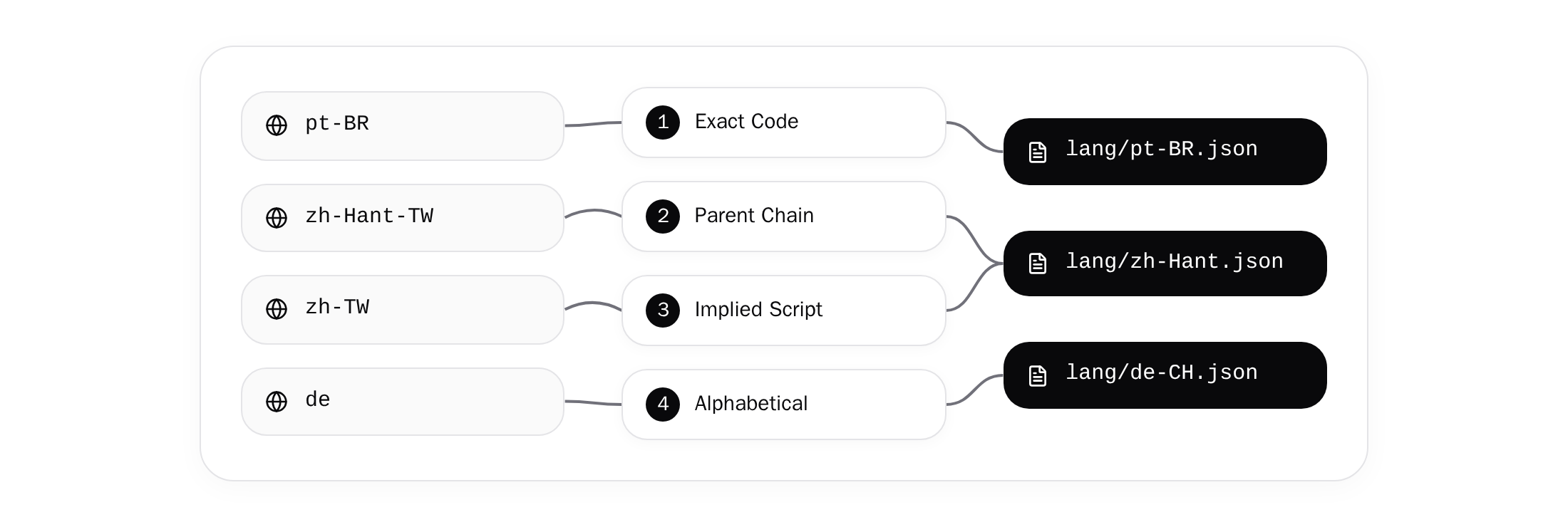
A lower-priority entry in Accept-Language never beats a valid match for a higher-priority entry. If a visitor sends pt, en and your app only has lang/pt-BR.json and lang/en.json, ODAC.JS serves pt-BR rather than skipping to English. Variants, extensions, and private-use subtags are stripped from headers automatically, so de-CH-1996 resolves cleanly as de-CH.
Canonical State Across Server, Intl, and Browser
Messy locale normalization usually leaks straight into application code. One controller receives pt_br, another gets PT-BR, and suddenly new Intl.NumberFormat() throws a RangeError or your <html lang> attribute renders lowercase garbage.
In ODAC.JS 1.8.0, Odac.Lang.set() accepts any casing and either - or _ separators (pt_br, PT-BR), matching against supported languages with the same four-step resolution rules. Internally and on output, everything stays canonical:
Odac.Lang.current()always returns canonical BCP-47 casing (such aspt-BRorzh-Hant), safe forIntl.DateTimeFormat,Intl.NumberFormat, andtoLocaleDateString().Odac.Lang.dir()returns'rtl'or'ltr', checking right-to-left script subtags (such aspa-Arab) before language defaults.- Automatic
<html lang>anddir: Whenever your app declares multiple languages or setslang.defaultorlang.supportedinodac.json, ODAC.JS injects the resolvedlanganddironto<html>, sends theContent-Languageheader, and updates<html lang dir>on AJAX navigation automatically. - Cache-safe headers: When language selection depends on
Accept-Language, ODAC.JS addsVary: Accept-Languageso shared caches and the ODAC Proxy never serve one visitor's language to another. When you route by URL (/{lang}/about) and callOdac.Lang.set(), noVaryheader is needed andOdac.cache()caches one clean copy per URL.
Browser scripts inside view/js/ share the exact same canonical state through Odac.lang(), __() and __x(), receiving only the keys they actually use embedded in the page:
// view/js/checkout.js
Odac.action({
  load() {
    const formatter = new Intl.NumberFormat(Odac.lang(), {
      style: 'currency',
      currency: 'BRL'
    })

    const label = document.querySelector('#bus-fare')
    label.textContent = __('Bus') + ': ' + formatter.format(5.5)
  }
})
And if you edit lang/pt-BR.json on a running server, each worker checks for file updates every 2 seconds in the background. Server views, view/js/ translations on the next AJAX navigation, and proxy-cached pages pick up the changes with zero restarts and zero manual cache invalidation. If someone saves invalid JSON mid-edit, ODAC.JS logs a warning and keeps serving the last valid version until the syntax is fixed.
Migrating Existing Projects and CI Gotchas
Upgrading an existing ODAC.JS application takes less than two minutes:
- Move your translation directory: Run
git mv storage/language langat your project root. - Simplify
.gitignore: Remove any!storage/language/negation rule sostorage/stays cleanly ignored. - Configure external volumes if needed: Add
"path": "/mnt/translations"underlanginodac.jsonif your production environment mounts translations outside the app root. - Add regional overrides and verify in CI: Create sparse files like
lang/pt-BR.jsonorlang/zh-Hant.jsonwith only differing keys, then runnpx odac lang:check --strictin your CI pipeline.
Keep two strict rules in mind as you add regional files:
- Use canonical casing on disk: Translation filenames must match canonical BCP-47 casing (
pt-BR.json,zh-Hant.json,es-419.json). Files namedpt-br.jsonorpt_BR.jsonare ignored on disk. - Name Chinese files by script: Because browsers send
zh-TWandzh-CNwhile implied mapping targetszh-Hantandzh-Hans, naming your fileslang/zh-Hant.jsonandlang/zh-Hans.jsoncovers Taiwan, Hong Kong, and mainland visitors cleanly from two files.
Support for the legacy storage/language/ path remains active in 1.8.0 with a deprecation warning per worker, and will be removed in a future major release. Moving to lang/ now gives you clean version control, zero-duplication regional overrides, and predictable BCP-47 matching across every layer of your stack.