Never Lose a User's Language in ODAC.JS
Most web frameworks declare victory on internationalization the moment a navigation bar switches from English to Turkish. Then the visitor clicks Submit on a signup form, triggers a passwordless sign-in link, or opens a welcome email, and the entire experience snaps back to hardcoded English.
ODAC.JS v1.8.0 laid the foundation with project-root lang/ files, regional fallback (pt-BR to pt), background reloading, and the odac lang:* CLI workflow. Yet three stubborn boundaries still broke out of a page's active language: form submissions hitting language-neutral endpoints, transactional emails rendered outside the page's scope, and built-in authentication and form messages.
With ODAC.JS v1.8.1 and v1.8.2, those three boundaries are gone. Your application now carries a visitor's language seamlessly from the initial page render, through form validation and server actions, into every transactional email, and back into every framework error message.
Show Me The Code
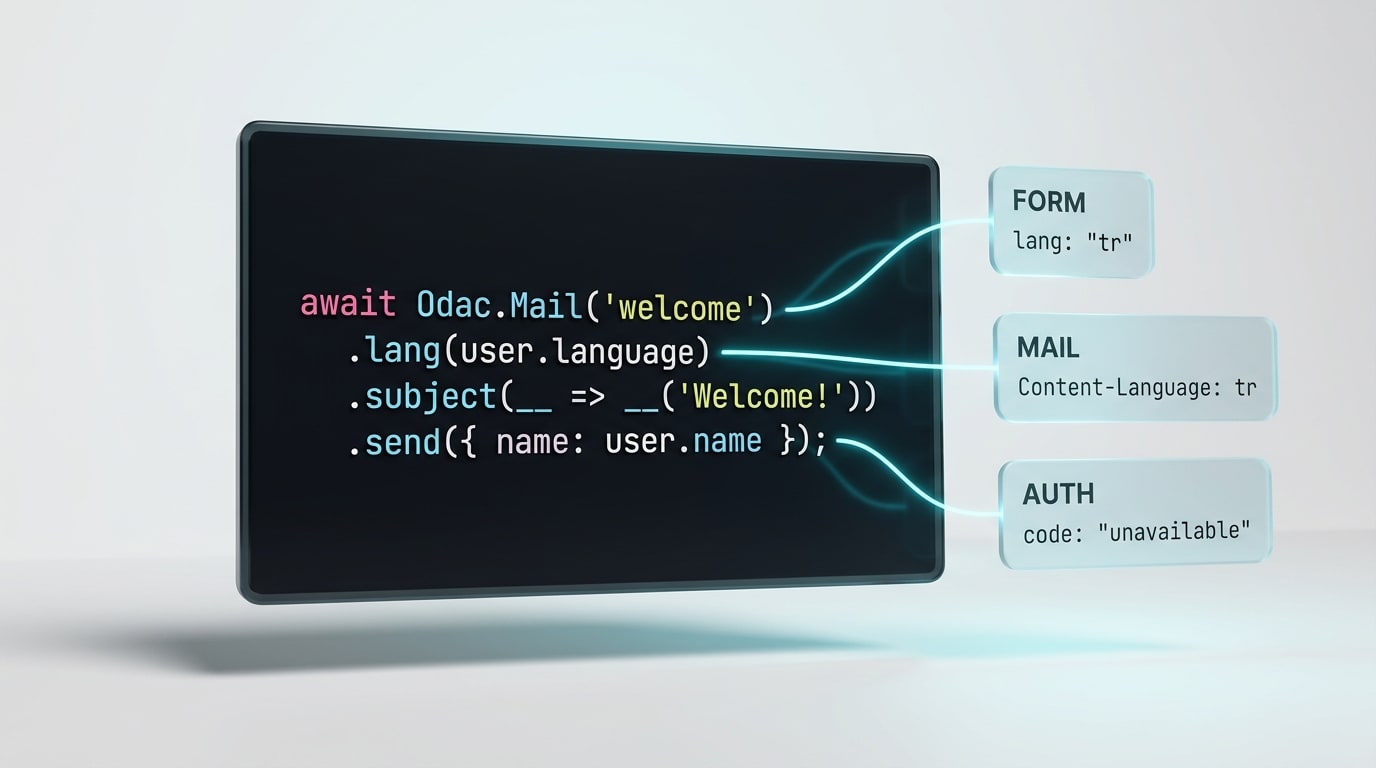
Before diving into the architectural trade-offs behind each fix, here is what end-to-end localization looks like in ODAC.JS today. No hidden language inputs, no manual Odac.Lang.set() calls inside action handlers, and no fragile string matching on translated error text.
<!-- view/content/contact.html -->
<odac:form action="Contact.send">
  <odac:input
    name="email"
    type="email"
    label="{{ __('Email Address') }}"
    placeholder="{{ __('you@northstar.dev') }}"
  />
  <odac:submit loading="{{ __('Saving...') }}">
    <i class="icon-save"></i> <odac translate>Save</odac>
  </odac:submit>
</odac:form>
// 1. Send transactional mail in the recipient's language without touching global state
await Odac.Mail('welcome')
  .lang(user.language)
  .from('noreply@myapp.com', 'My App')
  .to(user.email, user.name)
  .subject(__ => __('Welcome!'))
  .send({ name: user.name })

// 2. Send a magic link in an explicit language (or omit `lang` to inherit the form language)
const magic = await Odac.Auth.magic(email, {
  redirect: '/dashboard',
  lang: user.language
})

// 3. Branch on structured codes rather than translated error strings
const reg = await Odac.Auth.register(payload)
if (!reg.success) {
  if (reg.code === 'unavailable') {
    return Odac.return({ status: 503, error: reg.error })
  }
  return Odac.return({ field: reg.field, error: reg.error })
}
Every piece of this pipeline respects its own boundary automatically. Let us examine why each boundary used to break and what we refused to compromise on while fixing it.
Boundary 1: Why Forms Forgot the Page Language
Public multilingual sites in ODAC.JS put the language directly in the URL, such as /tr/register or /de/contact, and call Odac.Lang.set() inside the page controller. That keeps URLs search-indexable and lets the ODAC.JS Proxy cache each language independently without Vary: Accept-Language disabling shared caching.
The trouble started the moment the visitor submitted the form. ODAC.JS forms (<odac:form>, <odac:login>, <odac:register>, and <odac:magic-login>) post to dedicated, language-neutral endpoints such as /_odac/form, /_odac/register, or your custom action target.
Because those POST URLs do not include /{lang}, the controller that called Odac.Lang.set('tr') never ran on submission. Instead, the request fell back to the browser's Accept-Language header. If a visitor with an English browser OS browsed /tr/register and submitted an invalid email, the validation error came back in English.
Why Hidden Inputs Were Never an Option
In Express or traditional MVC apps, developers solve this by stuffing a hidden <input name="lang" value="tr"> into every form template and reading it back on the server. That pattern introduces two problems we refused to accept in ODAC.JS:
- Boilerplate Tax: Every
actionmethod and<odac:set callback>function would have to manually extract, validate, and callOdac.Lang.set()before touching a single error message. - Zero-Config Violation: Built-in forms like
<odac:login>and<odac:register>exist so you do not have to write controllers at all. Forcing developers to wire up language plumbing defeats the entire component model.
Instead, ODAC.JS now leverages a mechanism it already enforces on every form: the server-side session token. When a form renders on /tr/register, ODAC.JS stores the active language directly inside that form's session configuration.
When the visitor submits the form, ODAC.JS restores that stored language before validation rules, <odac:set callback> functions, or your action controller ever execute. If the stored language is no longer in lang.supported, standard fallback rules still apply, and if an action explicitly wants to switch languages (for example, to a newly signed-in user's saved preference), calling Odac.Lang.set() still overrides it cleanly.

Fixing <odac:submit> Attributes and Markup Bodies
Form localization also exposed two subtle rough edges on <odac:submit>. Previously, passing a {{ __('...') }} expression inside attributes could truncate at inner quotes, and custom markup inside <odac:submit> (such as an icon alongside <odac translate>) lost its HTML structure when the client runtime restored the button after its loading state.
Both issues are resolved in v1.8.1 and v1.8.2:
- Expression-Safe Attributes:
textandloadingon<odac:submit>, alongsidelabelandplaceholderon<odac:input>, resolve{{ __('...') }}expressions cleanly per request. - Rich Button Bodies: Placing
<odac translate>and HTML icons inside<odac:submit>...</odac:submit>compiles normally and restores the full inner markup when the form request finishes, even on transport failures. - Clear Precedence: If both
textand a tag body are present,textwins, and every<odac:submit>within a form keeps its owntext,loading,class,style, andid.
Boundary 2: Transactional Mail Must Stay Isolated
HTTP requests have a visitor, headers, and a request-scoped Odac context. Transactional emails have none of those guarantees.
Think about two common scenarios in production Node.js applications:
- An English-speaking support agent approves a payout for a Brazilian customer inside an admin dashboard, triggering a notification email in
pt-BR. - A nightly cron job defined with
Odac.Route.cron()iterates over 500 expiring subscriptions acrossen,tr, anddeaccounts.
Previously, calling Odac.Lang.set(user.language) right before Odac.Mail(...).send() failed in both places for different reasons. Inside an HTTP handler, the mail renderer did not inherit the controller's request language and fell back to the global default. Inside a background cron job, mutating global language state meant concurrent async iterations could overwrite each other mid-flight.
Per-Mail Language Scoping with .lang() and .subject()
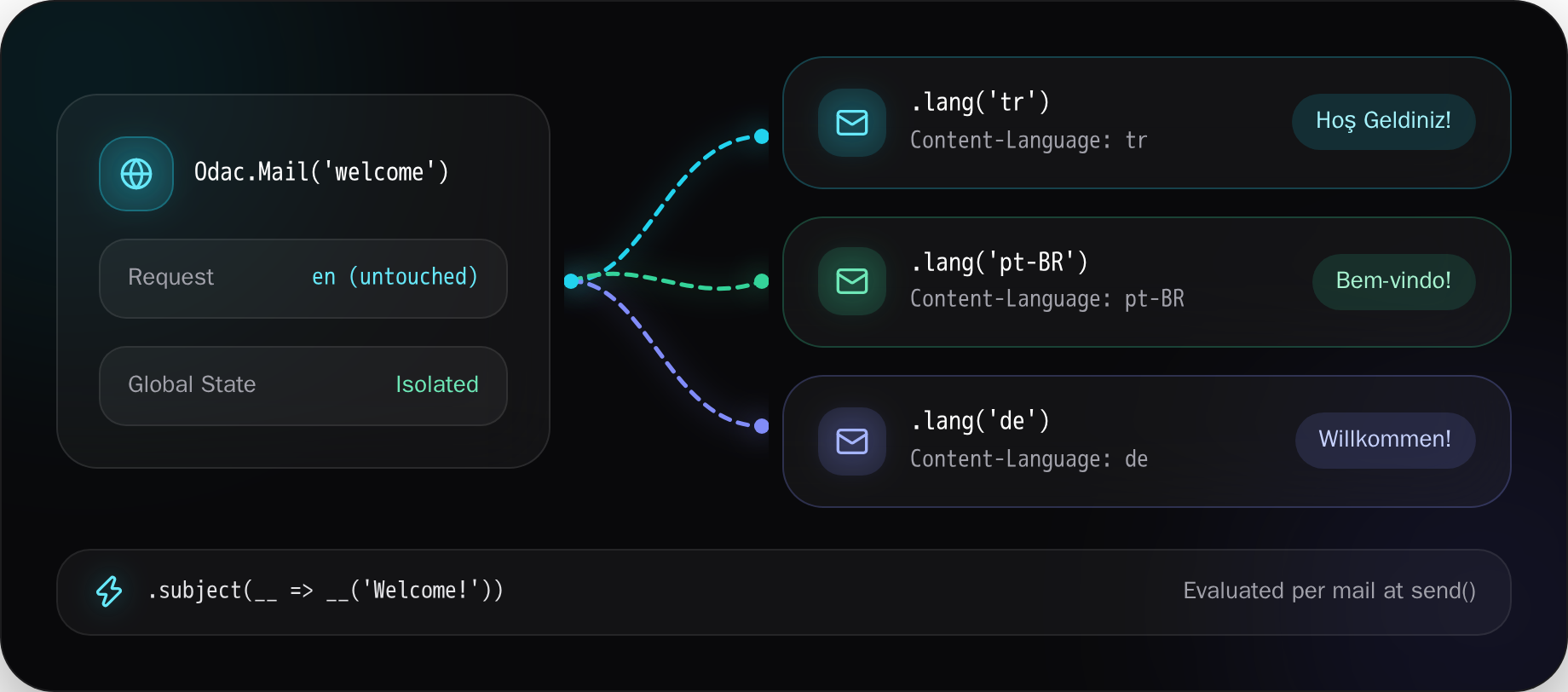
Odac.Mail now isolates localization to the individual email instance via .lang(code) and deferred subject evaluation via .subject(fn).
// controller/Order.js or controller/cron/digest.js
await Odac.Mail('invoice_ready')
  .lang(customer.language)
  .from('billing@myapp.com', 'My App Billing')
  .to(customer.email, customer.name)
  .subject(__ => __('Your invoice #%s1 is ready', invoice.number))
  .send({
    customer_name: customer.name,
    amount: invoice.formattedTotal
  })
Here is what .lang(code) guarantees without touching Odac.Lang for the active HTTP request or neighboring jobs:
- Full Template Isolation:
__(),<odac translate>,Odac.__(), andOdac.Langinsideview/mail/invoice_ready.htmland every reusable component inview/mail/components/evaluate strictly incustomer.language. - Standards-Compliant Headers: ODAC.JS automatically attaches the matching
Content-Languageheader to the outgoing mail payload, while missing or unsupported codes fall back cleanly tolang.default. - Order-Independent Subject Translation: Passing a plain string like
.subject('Welcome!')sends that string verbatim without translation. Passing a function like.subject(__ => __('Welcome!'))defers evaluation until.send()runs, so it always uses the mail's.lang()regardless of whether.lang()was called before or after.subject().
Notice one subtle bonus of .subject(__ => __('Welcome!')): because the callback still uses a literal string inside __(), npx odac lang:sync and npx odac lang:check scan and extract the subject key right alongside your view templates.
Magic Links Follow the Same Rule
Built-in magic-link emails sent through <odac:magic-login> automatically inherit the rendered form's language, so a visitor requesting a sign-in link from /tr/login receives the email in Turkish out of the box. When calling Odac.Auth.magic() programmatically from a custom API or onboarding job, pass lang and an optional subject callback:
const magic = await Odac.Auth.magic(user.email, {
  redirect: '/dashboard',
  errorRedirect: '/login',
  subject: __ => __('Sign in to My App'),
  lang: user.language
})
Never call Odac.Lang.set() as a workaround before sending mail. Keep request state for the visitor at the keyboard and .lang() for the recipient in the inbox.
Boundary 3: Framework Messages and Structured Error Codes
Nothing breaks the illusion of a localized product faster than a polished Turkish signup form returning "Form session expired. Please refresh the page." or "email already exists" in English.
In ODAC.JS v1.8.1 and v1.8.2, all 46 visitor-facing framework messages are wired through your lang/*.json translation files. That covers errors and confirmations across <odac:form>, <odac:login>, <odac:register>, and <odac:magic-login>, the error and message strings returned by Odac.Auth.register(), Odac.Auth.magic(), and Odac.Auth.verifyMagicLink(), the magic-link mail subject, and the standalone magic-link error page.
// lang/tr.json
{
  "%s already exists": "%s zaten kayıtlı",
  "Invalid credentials": "Geçersiz giriş bilgileri",
  "Form session expired. Please refresh the page.": "Form oturumunun süresi doldu. Lütfen sayfayı yenileyin.",
  "Registration successful": "Kayıt başarılı",
  "This sign-in link has expired. Please request a new one.": "Bu giriş bağlantısının süresi dolmuş. Lütfen yeni bir tane isteyin."
}
Dynamic values use %s placeholders, and every key is written in clear, human-readable English so translators immediately understand the context.
Why odac lang:sync Does Not Dump All 46 Keys Upfront
You might wonder why running npx odac lang:sync does not pre-populate all 46 framework keys into every project's lang/*.json files. That decision is deliberate.
If your application uses custom forms and password login, dumping 20 magic-link and registration error keys into lang/tr.json creates dead weight for translators. Instead, ODAC.JS collects framework keys lazily in debug mode: the first time your app actually displays a framework message while key collection is active, that key is written to every lang/*.json file automatically.
Once a framework key lives in your language files, npx odac lang:check and npx odac lang:prune treat it as a recognized framework key and never flag it as unused.
Branch on code and field, Never on Error Text
Translating Odac.Auth responses introduces one rule that every developer must respect: never compare translated error or message strings in application logic.
If a controller previously checked whether a registration failed because of a database outage by matching 'Database connection failed', that check would silently fail the moment lang/tr.json translates the message. ODAC.JS solves this by pairing human-readable translated messages with stable, machine-readable identifiers:
Odac.Auth.register(): Returns{ success: false, field, error }when a unique field collides, and{ success: false, code: 'unavailable', error }when the database cannot be reached.Odac.Auth.verifyMagicLink(): Returns{ success: false, code, error }wherecodeis'invalid','expired','denied', or'failed'.Odac.Auth.magicError(): Reads the failure stored in the session for a custom error page and returns{ code, message }ornull.
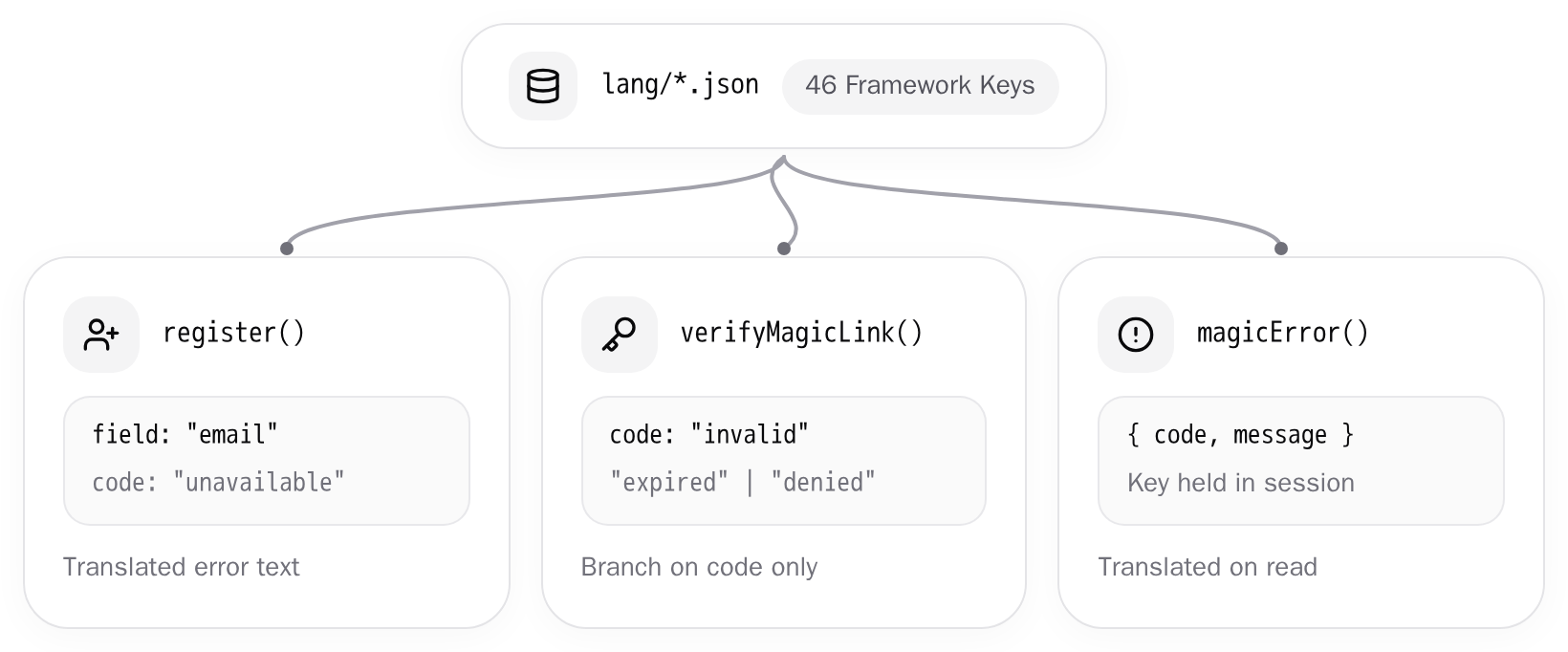
Notice an especially thoughtful detail about Odac.Auth.magicError(). When a magic link fails verification and redirects to a custom error page, ODAC.JS holds the untranslated key in the session and translates message only when magicError() is called. If your error page controller reads a URL parameter and calls Odac.Lang.set() before calling Odac.Auth.magicError(), the message arrives in the landing page's language automatically.
// controller/page/link-error.js
module.exports = async function (Odac) {
  const lang = Odac.Request.get('lang')
  if (lang) Odac.Lang.set(lang)

  const error = Odac.Auth.magicError()
  if (!error) return Odac.direct('/login')

  Odac.set('expired', error.code === 'expired')
  Odac.set('message', error.message)
  Odac.View.set({ skeleton: 'main', content: 'auth.link-error' })
}
Putting It All Together: A Multilingual Signup Flow
To see how clean this feels in a real application, let us trace a complete signup and onboarding flow for a Turkish visitor arriving at /tr/register.
First, map the language-prefixed route in route/www.js and render the registration view in controller/Register.js:
// route/www.js
Odac.Route.page('/{lang}/register', 'Register')
// controller/Register.js
module.exports = async function (Odac) {
  Odac.Lang.set(Odac.request('lang'))
  Odac.View.skeleton('main').set('content', 'register')
}
In view/content/register.html, define the form using <odac:form> (backed by a custom action so we can send a localized welcome email right after creating the account):
<!-- view/content/register.html -->
<odac:form action="Account.signup">
  <odac:input
    name="name"
    type="text"
    label="{{ __('Full Name') }}"
    placeholder="{{ __('Ada Lovelace') }}"
  >
    <odac:validate rule="required|minlen:2" />
  </odac:input>

  <odac:input
    name="email"
    type="email"
    label="{{ __('Email Address') }}"
    placeholder="{{ __('ada@northstar.dev') }}"
  >
    <odac:validate rule="required|email" />
  </odac:input>

  <odac:input
    name="password"
    type="password"
    label="{{ __('Password') }}"
  >
    <odac:validate rule="required|minlen:8" />
  </odac:input>

  <odac:submit loading="{{ __('Creating account...') }}">
    <i class="icon-user-plus"></i> <odac translate>Create Account</odac>
  </odac:submit>
</odac:form>
Now look at controller/Account.js. Notice what is missing: there is no Odac.Lang.set() call, no hidden lang form field, and no English string comparison on reg.error.
// controller/Account.js
module.exports = class Account {
  constructor(Odac) {
    this.Odac = Odac
  }

  async signup(form) {
    const { name, email, password } = form.data
    const language = this.Odac.Lang.current()

    const reg = await this.Odac.Auth.register({
      name,
      email,
      password,
      language
    })

    if (!reg.success) {
      if (reg.code === 'unavailable') {
        return form.error('email', reg.error)
      }
      return form.error(reg.field || 'email', reg.error)
    }

    await this.Odac.Mail('welcome')
      .lang(language)
      .from('noreply@myapp.com', 'My App')
      .to(email, name)
      .subject(__ => __('Welcome to My App, %s1!', name))
      .send({ name })

    return form.success(
      this.Odac.__('Account created!'),
      `/${language}/dashboard`
    )
  }
}
When the visitor clicks Create Account, the entire lifecycle stays in 'tr':
- The form posts to
/_odac/form, and ODAC.JS restores'tr'from the form's session token before validation orAccount.signupruns. this.Odac.Lang.current()returns'tr', which we save directly onto the user record for future emails and notifications.- If
emailalready exists,reg.errorarrives in Turkish ("email zaten kayıtlı"), andform.error(reg.field || 'email', reg.error)highlights the exact input field. - On success,
Odac.Mail('welcome').lang(language)rendersview/mail/welcome.htmland evaluates the subject callback in Turkish without altering any shared state.
Gotchas Worth Remembering
Before upgrading your existing templates and mailers, keep these five rules in mind:
- Always pass a function to
.subject()when translating mail:.subject('Welcome!')sends the string verbatim;.subject(__ => __('Welcome!'))translates it in.lang()atsend()time and stays discoverable byodac lang:sync. - Never call
Odac.Lang.set()beforeOdac.Mail: Use.lang(user.language)on every mail chain so request handlers stay untouched and concurrent cron jobs never overwrite each other. - Expect lazy framework key collection: Run through your auth and form error states in
debugmode to populatelang/*.jsonwith the framework keys your app actually uses, then enforce completeness in CI withnpx odac lang:check --strict. - Keep
textvs. body precedence clear on<odac:submit>: If an element specifies bothtext="..."and inner markup,textoverrides the body. Omittextwhenever you want icons or<odac translate>inside the button. - Branch on
codeandfieldeverywhere: Anyif (result.error === '...')check is a latent bug in a multilingual app. Usecode('unavailable','invalid','expired','denied','failed') andfieldinstead.
Localization only feels finished when every boundary obeys the same rules as your views. By tying form language to session tokens, isolating transactional mail per recipient, and translating all 46 framework messages with structured error codes, ODAC.JS v1.8.1 and v1.8.2 let you build genuinely multilingual applications without a single line of glue code.