Stop Container SIGBUS Crashes with Custom Shared Memory

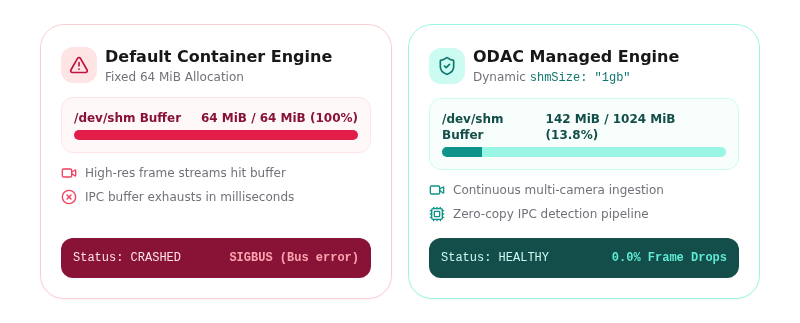
Container engines ship with a silent trap hidden in plain sight. By default, every Docker container is provisioned with a fixed 64 MiB /dev/shm shared memory mount. For typical web APIs or static sites, 64 MiB is plenty of head room. But the moment you deploy high-throughput multi-process workloads like Frigate NVR, computer vision pipelines, or local AI inference models, that tiny allocation becomes a fatal bottleneck.
When a camera decoder hands high-definition raw video frames to an object detector process over /dev/shm, the default allocation fills in milliseconds. The operating system does not throw a clean out-of-memory error. Instead, the container terminates abruptly with a cryptic SIGBUS or bus error, leaving process supervisors confused and log files empty.
ODAC solves this structural limitation by introducing native, dynamic /dev/shm resource sizing directly in app configurations and deployment payloads.
Why the Default Shared Memory Limit Fails High-Throughput Workloads
Shared memory in Linux is backed by tmpfs, a virtual memory filesystem stored in host RAM. Inter-process communication (IPC) relies on shared memory because it allows multiple processes to read and write to the exact same physical memory pages without the overhead of socket serialization or context switching.
In video processing architectures like Frigate NVR, raw camera feeds are decoded by FFmpeg processes and written directly as uncompressed RGB or YUV frames to shared memory buffers. Object detection engines then read those exact frames in real time. At 1080p or 4K resolutions across multiple camera feeds, frame buffers consume hundreds of megabytes in seconds.
Because standard container runtimes enforce a rigid 64 MiB limit on /dev/shm, these multi-process applications exhaust their allocation almost immediately under load. Increasing standard container memory limits does not help because /dev/shm operates as an independent tmpfs mount with its own isolated cap.
Sizing Shared Memory in ODAC
With ODAC, platform operators can scale /dev/shm dynamically without manually hacking underlying Docker compose files or running custom shell scripts on the target server.
You can configure shared memory sizing with one click during app creation at app.odac.run, or if you prefer the terminal, pass the configuration payload directly through the CLI:
{
  "name": "frigate-nvr",
  "type": "app",
  "app": "frigate",
  "shmSize": "1gb"
}
Deploying this application requires a single command:
odac app create frigate-nvr
ODAC accepts both human-readable strings such as 512mb, 1gb, or 2048mb and raw numeric byte values. This flexibility ensures seamless integration whether you are defining stack templates visually in the Cloud UI or automating deployments through CI/CD pipelines.
Architectural Deep Dive: How ODAC Handles Resource Sizing
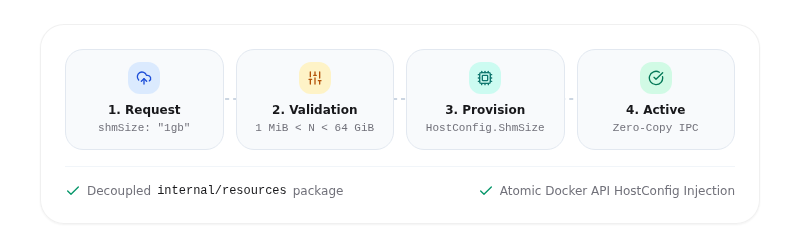
To make shared memory sizing both robust and host-safe, ODAC introduces a dedicated resource package (internal/resources) that decouples resource declarations from container execution engines.
+-----------------------------------------------------------------------+
|                              ODAC HUB                                 |
|                       (app.odac.run / CLI)                            |
+-----------------------------------------------------------------------+
                                   |
                                   v
+-----------------------------------------------------------------------+
|                       internal/resources                              |
|   - Validates shmSize unit strings ("1gb", "512mb", "2048mb")          |
|   - Enforces bounds: MinShmSize (1 MiB) < size < MaxShmSize (64 GiB)  |
+-----------------------------------------------------------------------+
                                   |
                                   v
+-----------------------------------------------------------------------+
|                        internal/appmgr                                |
|   - Parses recipe & payload requests with Cloud override precedence   |
|   - Applies Spec onto persistent application state                     |
+-----------------------------------------------------------------------+
                                   |
                                   v
+-----------------------------------------------------------------------+
|                        internal/docker                                |
|   - Translates Spec.ShmSize into Docker HostConfig.ShmSize            |
|   - Logs RAM allocation & provisions container atomically             |
+-----------------------------------------------------------------------+
Decoupled Resource Parsing and Unit Normalization
The parsing layer translates string declarations or numeric inputs into precise byte counts. It supports both binary and decimal suffix conventions (kib, kb, mib, mb, gib, gb), mapping them deterministically to powers of 1024.
func parseSize(text string) (float64, bool) {
	lower := strings.ToLower(text)
	unit := int64(1)
	for _, suffix := range []struct {
		name  string
		scale int64
	}{
		{"kib", 1 << 10}, {"kb", 1 << 10}, {"k", 1 << 10},
		{"mib", 1 << 20}, {"mb", 1 << 20}, {"m", 1 << 20},
		{"gib", 1 << 30}, {"gb", 1 << 30}, {"g", 1 << 30},
		{"b", 1},
	} {
		if strings.HasSuffix(lower, suffix.name) {
			unit = suffix.scale
			lower = strings.TrimSuffix(lower, suffix.name)
			break
		}
	}
	number, err := strconv.ParseFloat(strings.TrimSpace(lower), 64)
	if err != nil {
		return 0, false
	}
	return number * float64(unit), true
}
Safety Floors and Upper Sanity Bounds
Unbounded resource allocation in multi-tenant or automated environments introduces severe host stability risks. Because /dev/shm pages consume physical RAM from the host system, an unchecked container could easily exhaust host memory.
ODAC enforces strict lower and upper bounds on all shared memory requests:
- Unit-Mistake Floor (1 MiB): If an operator specifies a raw number like
512expecting megabytes, passing 512 bytes to Docker would result in immediate application failure. ODAC rejects requests below 1 MiB during validation and instructs the operator to specify explicit unit suffixes. - Sanity Ceiling (64 GiB): Shared memory requests are bounded at 64 GiB to protect host memory integrity against accidental or malicious payload declarations.
const (
	MinShmSize = int64(1) << 20  // 1 MiB floor
	MaxShmSize = int64(64) << 30 // 64 GiB ceiling
)
Atomic Container Engine Provisioning
Once validated by internal/appmgr, the resource specification is handed down to internal/docker. ODAC inspects the request and sets HostConfig.ShmSize before creating the container:
shmSize := c.shmHostConfig(name, options.Resources)

hostCfg := &container.HostConfig{
    RestartPolicy: container.RestartPolicy{Name: "unless-stopped"},
    Binds:         binds,
    Resources:     container.Resources{Devices: devices, DeviceRequests: gpuCfg.requests},
    PortBindings:  portBindings,
    NetworkMode:   container.NetworkMode(netMode),
    CapAdd:        kernelSpec.caps,
    Sysctls:       kernelSpec.sysctls,
    ShmSize:       shmSize,
}
When an application requests no custom shared memory allocation, ODAC sets ShmSize to 0, allowing Docker to default naturally to its standard baseline without mutating state unnecessarily.
Real-World Impact and Edge Cases
Sizing shared memory explicitly unlocks high-performance containerized processing without infrastructure hacks:
- Zero Silent Crashes: Video decoders and computer vision detectors stream high-definition frames continuously without unexpected
SIGBUSterminations. - Deterministic Deployment Validation: Malformed or out-of-bounds
shmSizerequests fail immediately during deployment pre-flight, giving operators instant actionable feedback rather than runtime failures hours later. - State Preservation: Custom
/dev/shmallocations are persisted cleanly inside application metadata, ensuring consistent state across container updates and host restarts.
By treating /dev/shm as a first-class resource knob alongside GPU acceleration and kernel capabilities, ODAC provides the control and resilience needed for modern, enterprise-grade cloud workloads.