Why Your AI Workloads Deserve Zero-Config GPU Passthrough
Running hardware-accelerated workloads on self-hosted infrastructure has traditionally been a fragile exercise in configuration management. A single missing driver, an unmapped device node, or a missing container toolkit binary usually results in either silent deployment failures or endless container crash loops.
Most deployment platforms treat GPUs as rigid, binary attachments. Either your server has the exact vendor driver wired into the container runtime, or your application refuses to launch entirely. We decided to solve this fundamental architectural friction in ODAC.
The Problem with All-or-Nothing Hardware Binding
When self-hosting local AI models like Ollama, media transcoding pipelines with FFmpeg, or real-time inference microservices, hardware acceleration is a massive performance multiplier. However, hardcoding host GPU expectations directly into application manifests creates severe operational pain points.
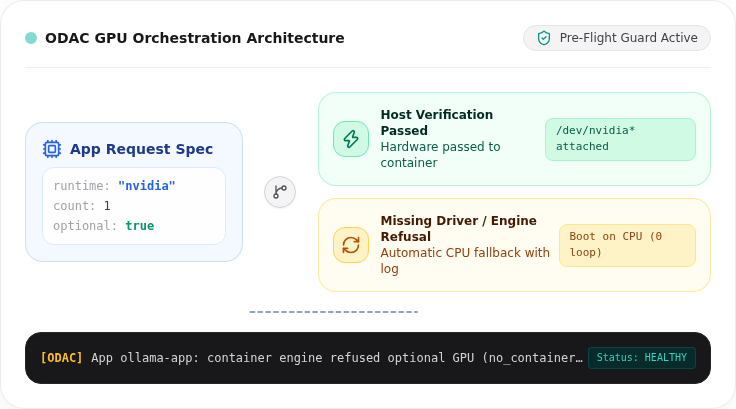
If you deploy a GPU-dependent application on a host lacking accelerator drivers, the container engine typically throws a low-level device error. The application enters an immediate restart loop, generating continuous noise in your logging pipeline while reporting misleading health states.
Conversely, if an application can run perfectly fine on a standard CPU but supports hardware acceleration, forcing the operator to choose between two completely separate container images or manifests creates unnecessary duplication and maintenance overhead.
Decoupled Accelerator Runtimes in ODAC
In ODAC, hardware accelerator reservations are managed by a dedicated, dependency-free subsystem (internal/gpu and internal/appmgr/gpu.go). Rather than hard-locking container creation to fixed hardware assumptions, ODAC separates accelerator runtime selection from host availability.
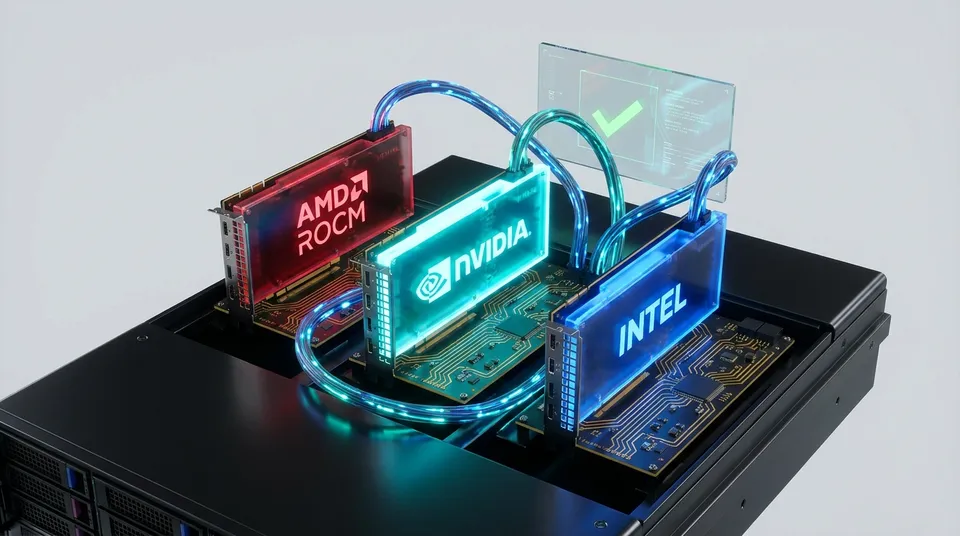
ODAC automatically detects installed hardware across NVIDIA, AMD (ROCm), and Intel accelerators during host inventory checks. When an application requests GPU hardware, ODAC evaluates host capabilities in real time before container creation occurs.
How Optional Passthrough Works
The core breakthrough in our GPU architecture is the concept of optional reservations. Applications can express hardware acceleration as an opportunistic preference rather than an absolute requirement.
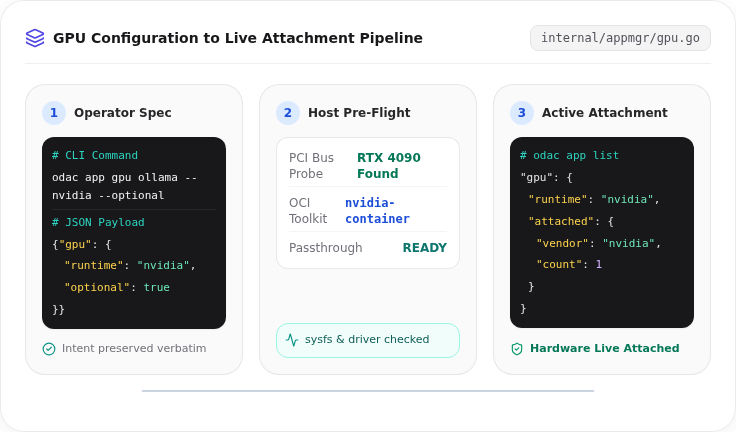
You can configure hardware acceleration directly from the ODAC Cloud dashboard at app.odac.run with a single toggle. If you prefer working from the terminal, you can issue a single command using the ODAC CLI:
# Reserve host GPU with automatic vendor detection
odac app gpu my-app

# Request NVIDIA runtime as an optional preference
odac app gpu my-app --nvidia --count 1 --optional

# Inspect attached hardware devices across all apps
odac app list
You can also define hardware reservations directly within your application creation JSON payload:
{
  "name": "ollama-app",
  "type": "app",
  "app": "ollama",
  "gpu": {
    "runtime": "nvidia",
    "count": 1,
    "optional": true
  }
}
When --optional is active, ODAC inspects the underlying host system sysfs tree and container engine capabilities (internal/sysinfo/gpu.go). If the host has the requested accelerator hardware and container runtime drivers installed (such as nvidia-container-toolkit or DRM render nodes under /dev/dri), ODAC safely passes the hardware devices into the container.
If the required host driver or container toolkit is missing, ODAC logs an explicit diagnostic message explaining the missing dependency and seamlessly boots the application on the CPU instead.
Under the Hood: Pre-Flight Verification and Engine Fallback
To achieve true operational resilience, ODAC uses a two-tiered verification model:
- Host Pre-Flight Inspection: Before handing container parameters to the Docker engine, ODAC's
resolveGPUfunction queries host capabilities. If an application requests an optional GPU on a host with no compatible drivers, ODAC converts the request to a pure CPU start before container creation even begins. - Engine Runtime Fallback: If host probes report that a GPU is available but the container engine refuses the device attachment at runtime (for instance, if a device node disappeared dynamically), ODAC's
startWithGPUFallbackmechanism catches the error, logs the diagnostic context, and retries container startup on the CPU.
This dual-layer defense eliminates infinite respawn loops entirely. Your applications stay online and functional regardless of underlying driver state changes.
Step-by-Step Scenario: Provisioning an AI Workload
Let us walk through a practical deployment scenario on a server where you want to run an LLM inference service:
- Deploy the Application: Create your AI service effortlessly from app.odac.run or via the CLI with
odac app create -n my-app -u https://github.com/example/ai-service. - Attach Optional GPU Reservation: Enable optional GPU acceleration from the dashboard or execute
odac app gpu my-app --nvidia --optional. - Automatic Pre-Flight Check: ODAC verifies host driver presence and checks whether
nvidia-container-toolkitis registered with the container daemon. - Apply Changes: Restart the application from app.odac.run or by running
odac app restart my-appto apply container device attachments. Inspect the runtime status and attached hardware usingodac app list.
Key Operational Behaviors & Edge Cases
When deploying hardware-accelerated containers with ODAC, keep the following operational nuances in mind:
- Restart Required for Device Binding: Device attachments are evaluated and applied during container creation. Modifying a GPU reservation on an active application requires an explicit restart (
odac app restart my-app) to update the underlying container configuration. - Transparent Driver Diagnostics: If optional passthrough falls back to CPU execution, ODAC records the precise reason (e.g.,
no_container_runtimeorno_render_node) in the deployment logs, giving operators immediate clarity without breaking service availability. - Preserved Request Intent: In
odac app listoutput, ODAC keeps the requested specification distinct from the currently attached hardware. This guarantees that moving an app configuration across servers never freezes host-specific device paths into your application definitions.
By decoupling hardware specifications from host constraints, ODAC provides a resilient, zero-config foundation for AI, machine learning, and media processing on self-hosted infrastructure.