Why We Rewrote ODAC in Go

Running a cloud orchestrator on a runtime that requires 80MB of RAM just to say "Hello World" is a developer tax we refused to pay any longer. With the release of ODAC v2, we made a radical decision: we ripped out every single line of JavaScript from our core platform and rewrote the entire orchestration, CLI, and process supervision stack in native Go.
For a self-hosted cloud platform, every megabyte of overhead matters. When you run ODAC on your servers, we want almost all system resources dedicated to your database, your web server, and your applications, not the tool managing them. In this deep dive, we will unpack the architectural friction that forced us off Node.js, the design of our new multi-binary Go layout, and how we achieved sub-millisecond command execution times with isolated crash domains.
The Architectural Breaking Point: Node.js Overhead
Node.js is an exceptional runtime for building high-level APIs or dynamic web applications. However, using it to drive a continuous, self-hosted system daemon proved to be a fundamental mismatch. In ODAC v1, our background orchestrator, CLI, and watchdog process were all powered by Node.js.
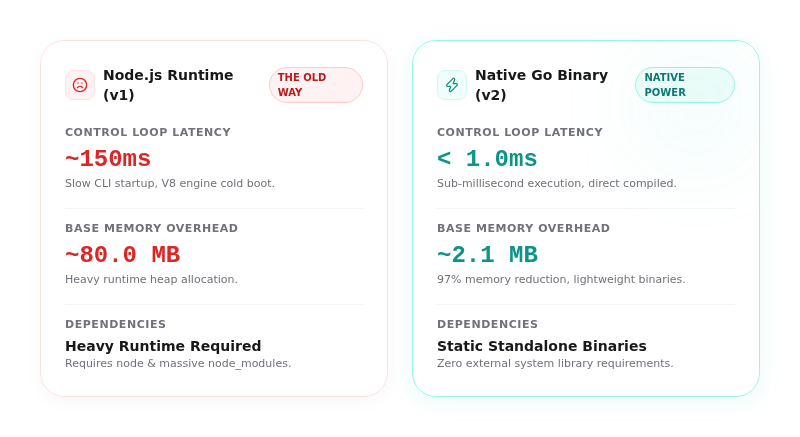
This decision carried a severe performance penalty. Every CLI invocation suffered from a 150ms startup latency as the V8 engine initialized and crawled through thousands of nested files in node_modules. More importantly, the system's idle memory footprint hovered around 80MB of RAM per background process. For developers running lightweight VPS instances with 1GB of RAM, this overhead meant paying for system management instead of application scale. We knew we had to build something cleaner, faster, and enterprise-grade.
The Redesigned Native Go Architecture
By migrating the entire ODAC engine to Go, we transformed our platform into a single Go module that compiles into six highly specialized, statically linked, zero-dependency native binaries. These binaries are shipped inside a single, lightweight Docker image or can be run directly on bare metal.
We restructured our codebase under a clean, modular cmd/ hierarchy:
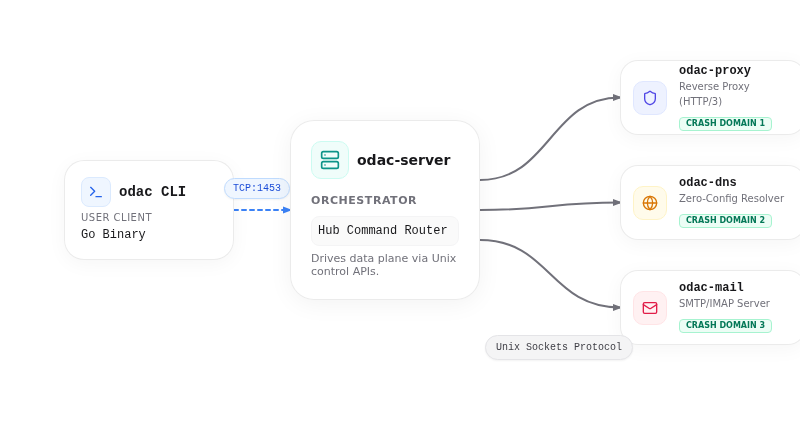
odac: The ultra-lightweight CLI client.odac-server: The central orchestrator that coordinates system state and runs deployment builds.odac-watchdog: The low-level supervisor process that monitors all other components.odac-proxy: The high-performance, QUIC-enabled data plane proxy.odac-dns: The zero-config DNS API and resolver.odac-mail: The built-in SMTP and IMAP mail server.
This multi-binary layout completely decouples the control plane from the data plane. It ensures that the core orchestration logic stays entirely separated from network-facing proxies and DNS servers.
Decoupled Process Boundaries and Isolated Crash Domains
In monolithic cloud management tools, a single unhandled exception or memory panic can bring down your entire hosting infrastructure. If the mail server crashes, it should never take the reverse proxy or the main web server down with it.
To address this, ODAC v2 enforces strict process boundaries. Each data plane daemon (odac-proxy, odac-mail, and odac-dns) runs inside its own operating system process, establishing isolated crash domains. A remotely triggered panic in the IMAP parser will only crash the odac-mail process, leaving your websites and DNS resolution completely untouched.
The central orchestrator monitors these daemons continuously and respawns any failed process on a tight 1-second check tick. This ensures maximum resilience and guarantees that a failure in one service does not cascade into a total platform outage.
Low-Level Protocol Design: Fast, Isolated IPC
To coordinate state across these decoupled binaries, we designed a high-performance, bi-level inter-process communication protocol.
First, the CLI client odac communicates with the odac-server orchestrator daemon over a local TCP loopback socket on port 1453, defined under internal/apiproto. To preserve absolute compatibility with existing systems, we use a single JSON request per TCP connection. The client writes the request payload and reads the reply stream, which contains progress lines terminated by carriage returns and line feeds, followed by a final JSON response. Once the response is sent, the server cleanly destroys the connection.
Second, the odac-server orchestrator drives the data plane daemons over private Unix domain sockets managed under internal/dataplane. This bi-level isolation means that while the CLI uses local TCP for universal cross-platform compatibility, the internal data plane commands flow through high-speed, zero-overhead Unix sockets that are completely inaccessible to the outside network.
Porting the Connection Manager with Zero Performance Overhead
The true test of our Go migration was porting the real-time connection manager (internal/hub), which serves as the WebSocket-exposed command surface connecting your local server to ODAC Cloud. We fully ported this subsystem with complete protocol parity and absolutely zero performance overhead.
The Go-based connection manager handles:
- Signed WebSocket links with secure HMAC verification.
- Real-time log-stream forwarding from active builds to your browser.
- Inbound command routing directly to the orchestrator.
- Isolated terminal sessions (
internal/hub/terminal.go) utilizing high-performance, binary WebSocket streams.
To protect the main connection from lag, we isolated terminal sessions on dedicated, per-session WebSockets. Keystrokes and terminal bytes are sent as raw binary frames, bypassing the main signed connection to avoid starving important keep-alive pings.
Cloud-First Experience Meets Instant CLI Execution
This architectural shift delivers a blazing-fast user experience, whether you manage your servers from our cloud dashboard or prefer working in the terminal.
For routine operations like creating an application, restarting services, or managing custom domains, you can trigger them with a single click from the cloud dashboard at app.odac.run. The ODAC Cloud UI instantly relays commands through the secure WebSocket connection.
If you prefer the command line, the new Go-compiled odac CLI is incredibly responsive. It boots, connects to the local server, and executes in less than a millisecond. Here is how you can use the native CLI to manage your apps:
To list your running applications:
odac app list
To create a new application directly from a Git repository:
odac app create --type git --url https://github.com/example/my-app.git --name production-web
To add a domain to your newly deployed application:
odac domain add mydomain.com production-web
The migration to native Go represents our unwavering commitment to performance, isolation, and efficiency. By eliminating runtime bloat, ODAC v2 ensures that every byte of memory and every CPU cycle on your server goes exactly where it belongs: to your applications.