Stop Fighting SMTP: Host Real Visual Email in Seconds
Hosting email on your own server has traditionally been a form of digital self-harm.
Between wrestling with complex transport agents, configuring secure storage directories, provisioning cryptographic certificates, and database synchronization, it is no wonder most developers surrender. We wave the white flag and pay corporate giants a hefty fee per seat just to have a custom domain address.
ODAC is here to end that surrender. We believe that self-hosting should mean owning your entire stack, and that includes your inbox.
With our latest update, we have brought enterprise-grade, zero-config email hosting directly to the Dashboard and the secure tunnel. You can now completely manage secure, custom mailboxes on your servers from a gorgeous visual interface. No configuration files, no manual database schemas, and no cryptographic headache.
Why Self-Hosted Mail Failed (And How We Fixed It)
Traditional self-hosted mail fails because the room for error is too thin. One single typo in an MX record or a missing cryptographic DKIM record, and your domain is permanently blacklisted.
Existing tools fail because they assume you are a full-time mail systems administrator. They throw dense configuration directives at you, forcing you to link database structures to SMTP relays manually.
ODAC changes the entire paradigm. By pairing your connected server to the visual cloud dashboard, the heavy lifting is completely automated. When you create an email address, ODAC instantly provisions secure mailbox folders, registers cryptographic 2048-bit RSA keys, and drafts the necessary DNS records. It is the first truly frictionless self-hosted mail server.
Step-by-Step: Provisioning Your First Inbox
The visual workflow at app.odac.run is designed to feel almost magical. Here is how easy it is to go from a blank server to a fully functioning mail client connection:
- Open the Email Manager: Log in to your ODAC Cloud dashboard at app.odac.run, navigate to your active server on the visual Live Canvas, and select the Email Manager option.
- Review Your Domain List: ODAC will automatically scan your server for active domains. Choose the domain where you want to host your mail accounts from the high-performance search-and-select bar.
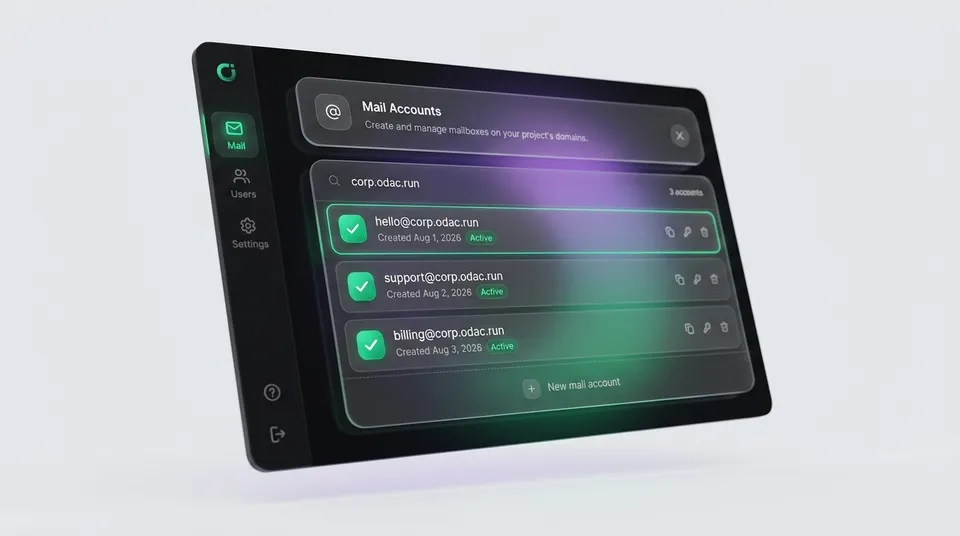
- Behold Your Mailboxes: The mail manager renders your current mailboxes in a premium glassmorphism interface, providing instant status indicators and quick action controls.
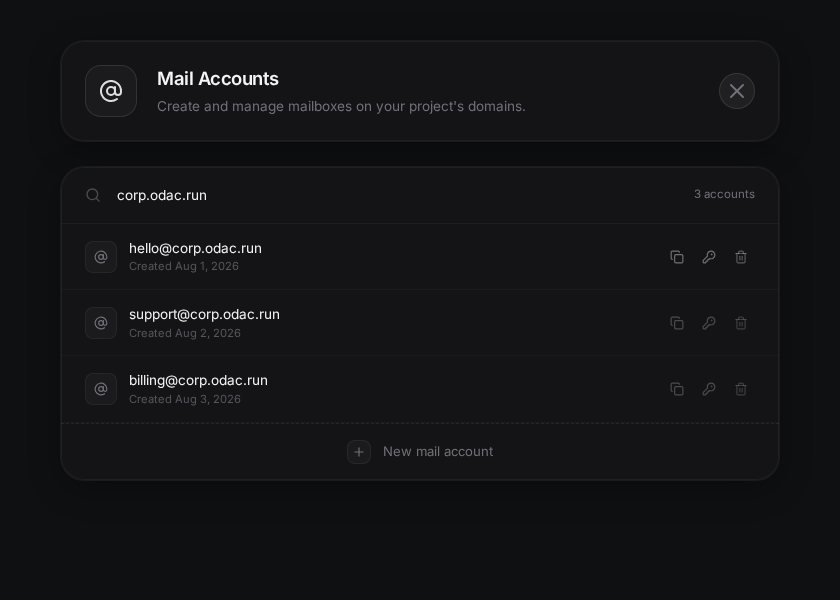
- Add a New Mailbox: Click on the "New mail account" placeholder at the bottom of the card to slide open the creation panel in a smooth, hardware-accelerated transition.
- Set Your Credentials: Type your desired username, and click the dice button to instantly generate a secure, cryptographically random password. Copy it to your clipboard with a single click.
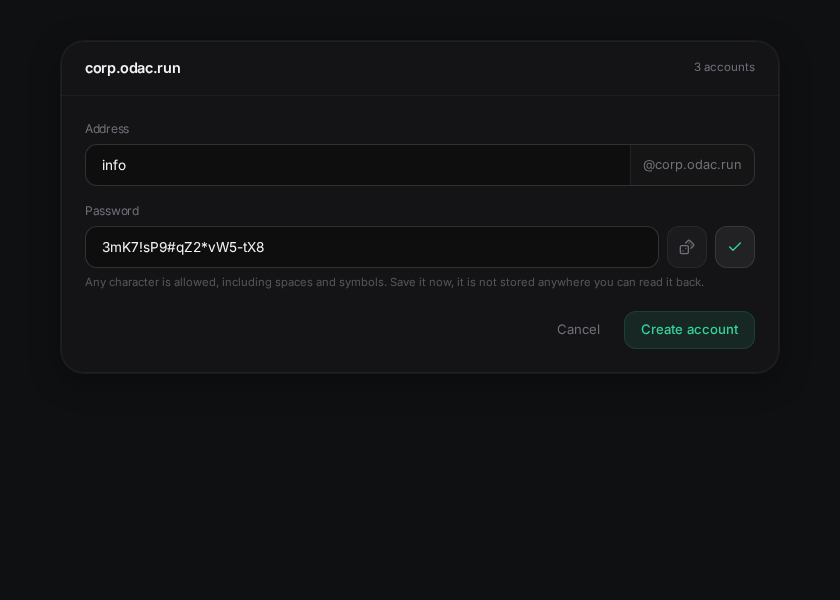
- Deploy Instantly: Click "Create account". Within milliseconds, ODAC transmits the encrypted request over your server's secure tunnel, initializes the mail folders, and establishes the database connection. Your new secure email is live and ready to receive mail.
Visual Poka-Yoke: Built-in Fault Tolerance
Our design philosophy is centered on preventing errors before they can even occur. If your server is momentarily offline or experiencing connectivity shifts, the dashboard intelligently displays a helpful status strip and lets you browse your cached, last-known mailboxes in read-only mode, disabling mutations to prevent silent update failures.
Furthermore, we handle password creation securely. Your mailbox password is shown clearly at creation so you can copy it safely, but it is never stored on ODAC Cloud in a readable format, preserving absolute zero-trust privacy.
For the Terminal Purists: The ODAC CLI
If you prefer operating from the command line, you can bypass the Dashboard entirely. The ODAC CLI is equipped with powerful, native mail commands that execute with the same speed and security.
Creating a mailbox is as simple as executing a single command:
odac mail create hello@corp.odac.run "secure-p@ss1"
To view all active mailboxes currently assigned to a domain, run:
odac mail list --domain corp.odac.run
And if you ever need to cycle an account's security keys or update a credentials password, do it in one sweep:
odac mail password hello@corp.odac.run "new-secure-p@ss2"
The Single Gotcha: DNS Propagation
While ODAC completely automates local records and cryptographic DKIM key generation, the laws of the internet still apply. If you host your authoritative DNS on a third-party registrar rather than ODAC's integrated DNS server, you will need to copy the generated MX and TXT fields over to your registrar.
Without those fields, external email providers (like Gmail or Outlook) will not know where to deliver your inbound letters, and your outbound messages may get caught in spam filters.
Reclaim Your Inbox Today
You no longer have to pay toll fees to large corporations just to have a professional communication channel. With ODAC, secure, lightning-fast visual mail hosting is just another native capability of your self-hosted server.
Head over to app.odac.run and provision your first custom mailbox in seconds.