Zero-Trust mTLS Without the OpenSSL Nightmare

Securing internal tools has always forced engineering teams to accept bad compromises. You want your admin dashboards, staging sites, and telemetry panels completely invisible to the public internet, but every available solution brings severe operational friction.
Traditional corporate VPNs require bloated client software that drops connections on mobile devices, drains laptop batteries, and introduces latency bottlenecks. Dynamic IP allowlists break the moment a team member visits a coffee shop or switches to mobile tethering. Basic HTTP authentication exposes credentials to credential-stuffing attacks.
Mutual TLS (mTLS) has long been the gold standard for Zero-Trust security. By requiring every visitor to present a cryptographically verified client certificate before completing the TLS handshake, you eliminate unauthorized traffic at the network edge.
Yet almost nobody implements mTLS voluntarily. The traditional setup demands manual Certificate Authority (CA) management, arcane OpenSSL CLI invocations, brittle web server configurations, and complicated certificate distribution workflows. Worse, browsers bombard visitors with intrusive certificate selection prompts across every unrelated public domain.
ODAC changes this equation permanently. Starting today, you can configure native, zero-config Mutual TLS and Client Certificate Management visually on the Live Canvas at app.odac.run.
The Hidden Frustrations of Traditional mTLS
To understand why ODAC rebuilt client certificate authentication from scratch, consider what securing an internal service usually looks like.
First, you set up an offline Certificate Authority using OpenSSL or an enterprise public key infrastructure. You generate private keys on shared jump boxes or developer laptops, run multi-step signing scripts with obscure configuration flags, and carefully copy CA bundles into reverse proxy configurations.
Second, revoking access is notoriously painful. When an employee departs or a laptop goes missing, updating Certificate Revocation Lists (CRLs) or maintaining Online Certificate Status Protocol (OCSP) responders requires manual server interventions and process restarts.
Third, the browser user experience is notoriously terrible. Standard web servers request client certificates by sending a list of accepted CA names during the TLS handshake. Browsers intercept this list and pop up a certificate picker modal for every visitor, even on public subdomains where certificates should never be requested.
ODAC eliminates every single one of these operational headaches through automated lifecycle management and intelligent edge isolation.
Zero-Trust Access Control on the Live Canvas
With ODAC, securing an internal endpoint requires zero manual certificate compilation and zero proxy configuration files. Everything happens directly on the Live Canvas dashboard at app.odac.run.
You select any domain or subdomain, open the Security settings, and instantly toggle between three distinct enforcement policies:
- Off: Public access without client authentication. Standard TLS encryption protects traffic, and visitors connect freely.
- Optional: The edge proxy accepts and verifies client certificates if presented, while still allowing unauthenticated visitors through. Ideal for gradual migrations or services that offer tiered administrative access.
- Required: Strict Zero-Trust lockdown. The edge terminates the TLS connection immediately if the visitor fails to present a trusted client certificate. Unauthorized packets never reach your application container.
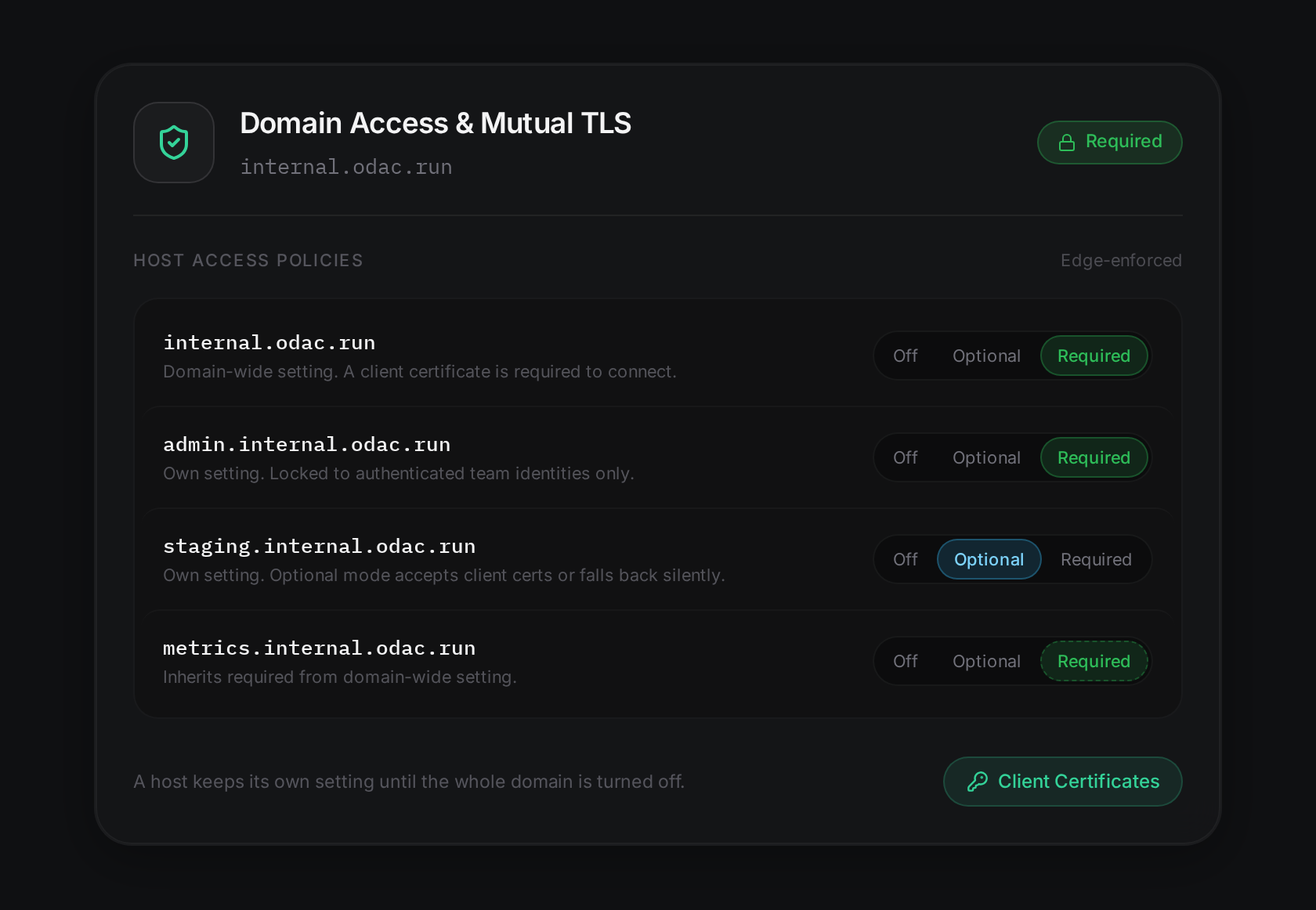
Behind this simple three-way toggle sits an intelligent per-host issuer architecture. Rather than using a generic, domain-wide Certificate Authority that triggers browser popups everywhere, ODAC automatically mints intermediate certificate authorities scoped specifically to each individual host.
When your team visits public pages on your apex domain, their browsers stay completely quiet. When they navigate to your protected internal admin domain, only the certificates minted for that exact host appear in their system certificate prompt.
Furthermore, on optional domains where no client certificates have been issued, ODAC maintains a silent handshake. This preserves modern HTTP/3 and 0-RTT connection speeds without prompting visitors unnecessarily.
Step-by-Step: Locking Down an Internal Service
Securing a service with ODAC takes less than sixty seconds from start to finish. Here is the complete workflow:
1. Enable Required Enforcement
Open your dashboard at app.odac.run, locate your service node on the Live Canvas, and click on your domain settings. Select the Security tab, navigate to Client Certificates, and toggle the access policy from Off to Required.
Your edge proxy updates in real time. Unauthenticated visitors attempting to access the domain are instantly rejected at the network edge before your backend containers expend a single CPU cycle.
2. Issue a Scoped Client Certificate
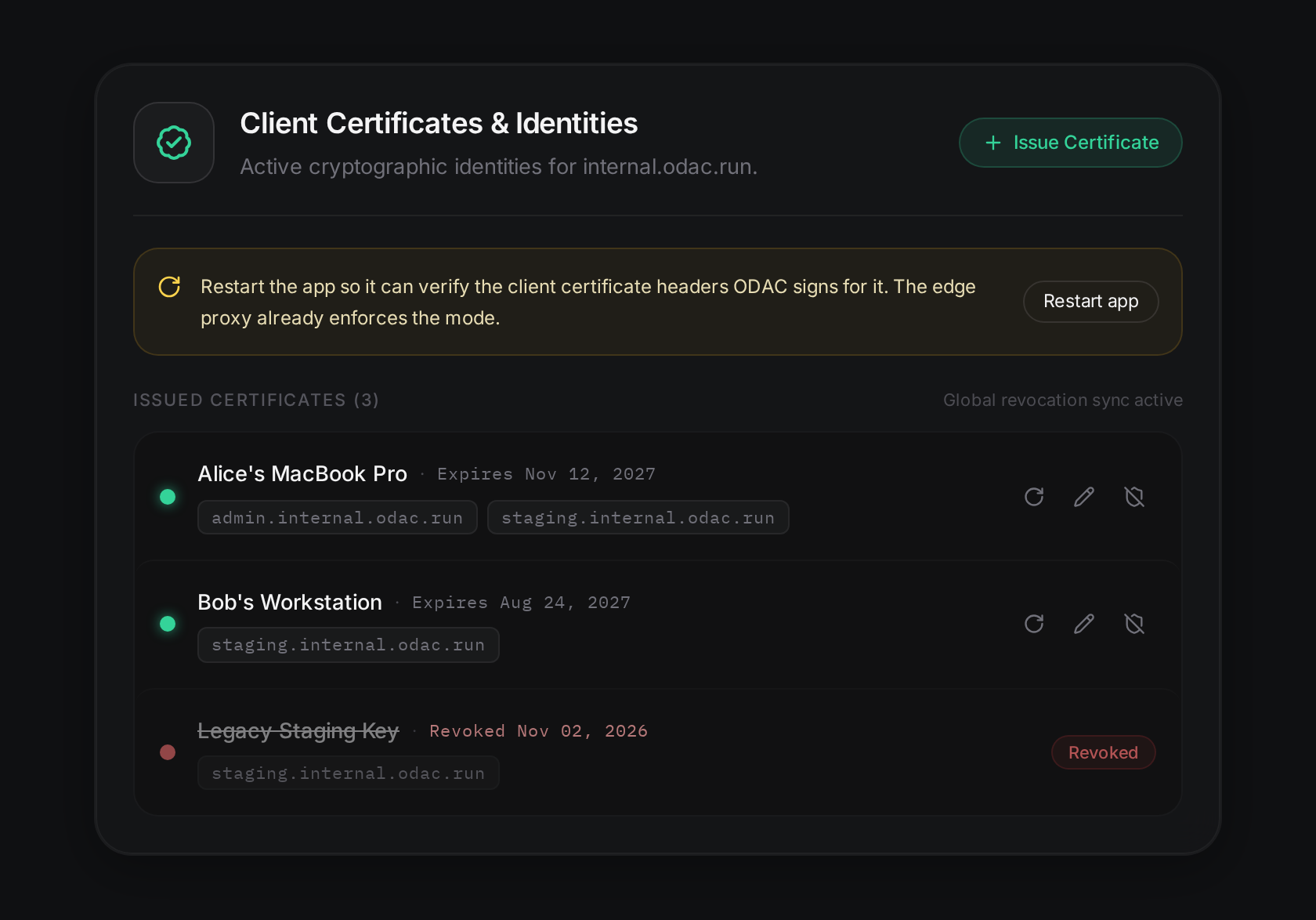
Click Issue Certificate to open the provisioning dialog. Enter a recognizable device name (such as "Alice's MacBook Pro"), choose the target hostnames this certificate should unlock, select the certificate validity duration, and specify a file encryption password.
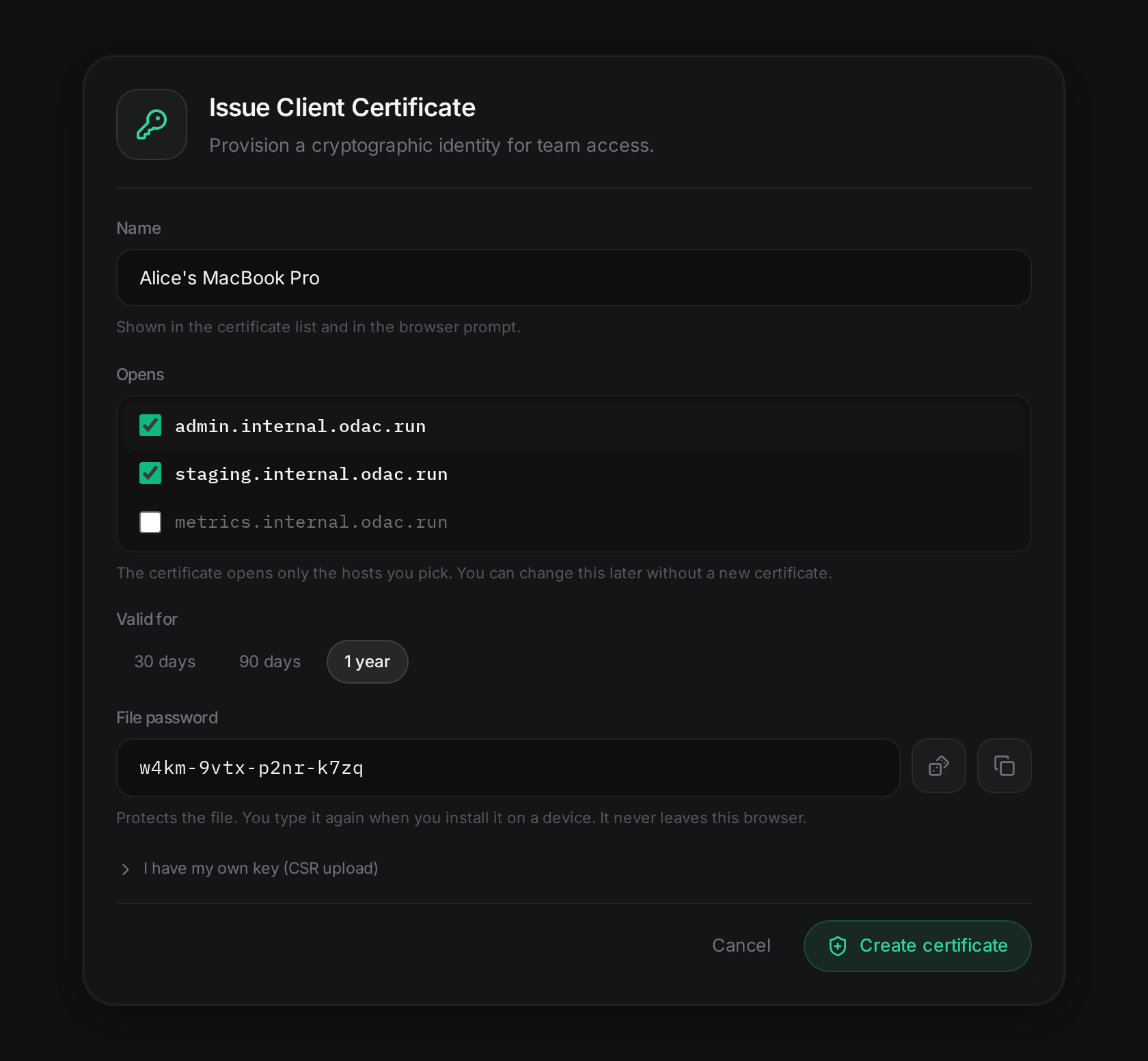
ODAC packages the cryptographic credentials into a standardized, password-protected PKCS#12 (.p12) bundle ready for immediate download. The private key generation and packaging workflow protects your secrets from end to end.
3. Install on Team Devices
Distribute the .p12 bundle to your team member alongside their generated password. Installing the credential requires a simple double-click:
- macOS: Opens Apple Keychain Access. Enter the file password and store the identity in your login keychain.
- Windows: Opens the Certificate Import Wizard. Follow the prompts to add the certificate to your Personal store.
- Linux / Web Browsers: Import directly into your browser's security preferences (such as Chrome or Firefox Certificate Manager) or operating system trust store.
4. Connect with Zero Friction
When Alice navigates to https://admin.internal.odac.run, her browser automatically presents the scoped certificate during the TLS handshake. Access is granted instantly, with hardware-level cryptographic assurance and zero VPN latency.
Real-Time Scoping and Instant Revocation
Infrastructure access requirements change constantly. Team members join projects, devices get replaced, and credentials need updates.
ODAC decouples certificate identity from hostname authorization. If a developer needs access to an additional staging service next month, you do not need to revoke their certificate and issue a new one. Simply open the Live Canvas, click Edit Scope, toggle the additional hostnames, and save. The edge proxy updates authorization rules instantly.
When a device is decommissioned or lost, one click on Revoke publishes a cryptographic revocation tombstone across edge nodes within milliseconds. The certificate is immediately blocked globally, preventing any further connections without requiring server restarts or proxy reloading.
Authenticating Users Inside Your Backend Code
While the ODAC edge proxy stops unauthorized traffic at the door, your application code often needs to know exactly which authenticated user or device made a request.
Traditional architectures force developers to terminate TLS directly inside their application runtime to inspect certificate fields. ODAC solves this elegantly by stripping the cryptographic burden from your application while guaranteeing absolute authenticity.
When an authenticated client connects, the ODAC proxy injects cryptographically signed headers into the proxied upstream request:
X-Odac-Client-Verify: The verification verdict (success).X-Odac-Client-Subject: The common name and subject string of the certificate.X-Odac-Client-Fingerprint: The unique SHA-256 fingerprint of the client certificate.X-Odac-Client-Serial: The certificate serial number.X-Odac-Client-Not-After: Expiration timestamp in RFC 3339 format.X-Odac-Client-Signature: A timestamped HMAC-SHA256 signature calculated over the canonical request payload.
To prevent header forgery or tampering, ODAC injects an environment variable named ODAC_CLIENT_CERT_KEY directly into your application container. Your backend code verifies the HMAC signature using this secret key. If the signature matches, you can trust the client identity implicitly without importing heavy cryptographic libraries.
Here is a complete, production-ready implementation in Node.js and Express:
import express from 'express';
import crypto from 'crypto';

const app = express();
const CLIENT_CERT_KEY = process.env.ODAC_CLIENT_CERT_KEY;

function verifyOdacClient(req) {
  const verifyStatus = req.headers['x-odac-client-verify'];
  if (verifyStatus !== 'success') {
    return { authenticated: false, reason: verifyStatus || 'missing_certificate' };
  }

  const sigHeader = req.headers['x-odac-client-signature'] || '';
  const match = sigHeader.match(/^t=(\d+),v1=([0-9a-f]+)$/);
  if (!match) {
    return { authenticated: false, reason: 'invalid_signature_format' };
  }

  const [, timestampStr, signature] = match;
  const timestamp = parseInt(timestampStr, 10);
  const now = Math.floor(Date.now() / 1000);

  // Reject signatures older than 60 seconds to prevent replay attacks
  if (Math.abs(now - timestamp) > 60) {
    return { authenticated: false, reason: 'signature_expired' };
  }

  // Construct canonical payload for HMAC validation
  const subject = req.headers['x-odac-client-subject'] || '';
  const issuer = req.headers['x-odac-client-issuer'] || '';
  const fingerprint = req.headers['x-odac-client-fingerprint'] || '';
  const serial = req.headers['x-odac-client-serial'] || '';
  const notAfter = req.headers['x-odac-client-not-after'] || '';

  const payload = [
    'v1',
    timestampStr,
    req.method,
    req.headers.host || '',
    req.originalUrl || req.url,
    verifyStatus,
    subject,
    issuer,
    fingerprint,
    serial,
    notAfter
  ].join('\n');

  const expectedSig = crypto
    .createHmac('sha256', CLIENT_CERT_KEY)
    .update(payload)
    .digest('hex');

  const sigValid = crypto.timingSafeEqual(
    Buffer.from(signature, 'hex'),
    Buffer.from(expectedSig, 'hex')
  );

  if (!sigValid) {
    return { authenticated: false, reason: 'signature_mismatch' };
  }

  return {
    authenticated: true,
    user: decodeURIComponent(subject),
    fingerprint
  };
}

app.get('/admin/dashboard', (req, res) => {
  const client = verifyOdacClient(req);
  if (!client.authenticated) {
    return res.status(403).json({
      error: 'Client certificate required',
      details: client.reason
    });
  }

  res.json({
    message: `Welcome, ${client.user}!`,
    fingerprint: client.fingerprint
  });
});

app.listen(3000);
Critical Architecture Details and Edge Cases
When designing high-assurance Zero-Trust systems, subtle edge cases matter. Here are four practical details to keep in mind when configuring mTLS on ODAC:
1. Published Host Ports Bypass mTLS
If your application container binds directly to a published host port on your server (for example, mapping container port 8080 to host port 8080), incoming traffic hitting that port directly reaches the container without passing through the ODAC reverse proxy.
ODAC actively inspects your deployment configuration. If you enable mTLS on a service that exposes raw published ports, the Live Canvas surfaces a prominent warning alert advising you to remove host port publishing so all traffic flows through the authenticated proxy.
2. Container Restart Required for HMAC Key Injection
When you activate mTLS on an application for the first time, ODAC generates a fresh cryptographic signing key and assigns it to your deployment. Your container must be restarted once so the platform can inject the ODAC_CLIENT_CERT_KEY environment variable. The dashboard provides a one-click restart button directly inside the security drawer.
3. Protocol Fallback Behavior
To negotiate client certificate challenges, domains with Required mTLS fall back from HTTP/3 (QUIC) to HTTP/2 during the TLS handshake. However, public domains and optional domains without active client certificates maintain full HTTP/3 performance and zero-RTT resumption.
4. Automatic Cache Bypass
When a request is verified with an authenticated client certificate, ODAC automatically bypasses the proxy cache. This ensures that customized administrative responses and sensitive internal data are never stored in shared edge caches.
True Zero-Trust for Modern Infrastructure
For years, engineering teams avoided Mutual TLS because the operational overhead eclipsed the security benefits. ODAC removes that friction entirely.
By bringing visual certificate lifecycle management, per-host issuer isolation, and tamper-proof backend header verification to the Live Canvas, ODAC provides enterprise-grade Zero-Trust access control with the click of a button.
Head over to app.odac.run, select your domain, and experience true zero-config mTLS today.